Dr Phone Repair Limited (Since 2015)
Tel: (09) 365-1212, Mobile: (021) 365-733
Here’s how you can copy music on your Apple Watch from your iPhone in a few easy steps. More details on this can be found here.
The Apple Watch is capable of all kinds of things from telling you the time to ordering you a cab and plenty of places in-between. It can also act as a new-age iPod too, though you’ll need a pair of Bluetooth earphones if you’re going to listen to music from your wrist. Or speakers if you want to go that way. We won’t judge you.
While Apple Watch allows you to listen to your entire music library from your iPhone remotely without having to copy the tracks over to the Watch itself, there are times when you would want to listen to music directly from Watch without having your iPhone around. Fortunately, Apple Watch allows you to do that easily. With up to 2GB of the Apple Watch’s 8GB of internal storage usable for music storage you should get around 500 tracks onto the thing before too much trouble, so here’s what you need to do.
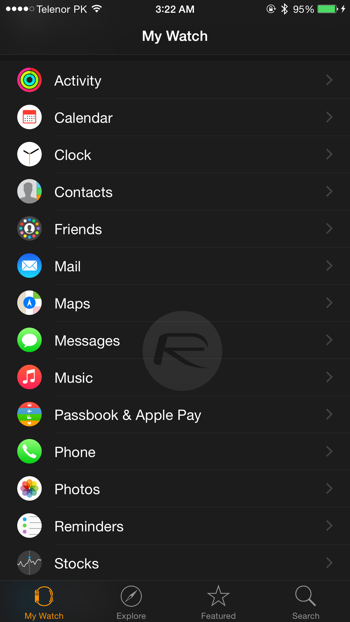
Step 1: Head on over to the Apple Watch app on your iPhone.
Step 2: Select ‘Music.’ Pretty self explanatory so far, no?
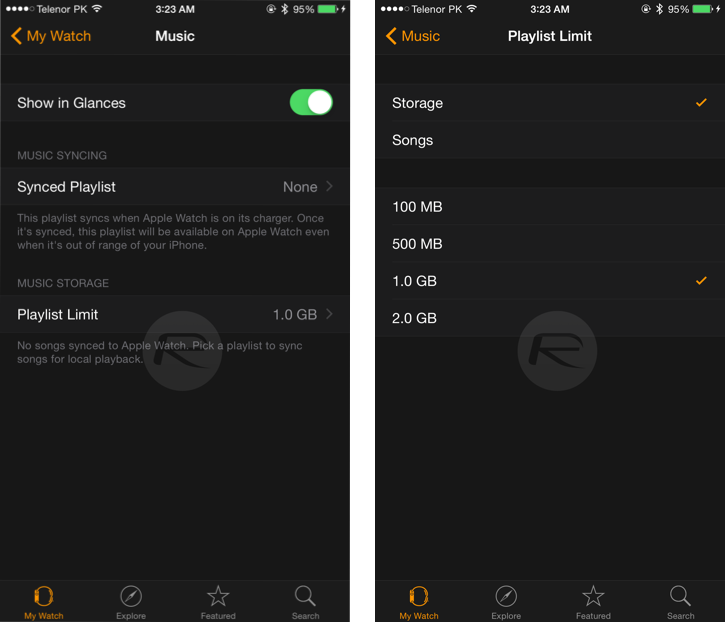
Step 3: Tell the Apple Watch how you want to manage storage by heading over to ‘Playlist Limit.’ Do you want to limit the number of songs that are synced, or just tell the Apple Watch to work to a specified storage capacity?
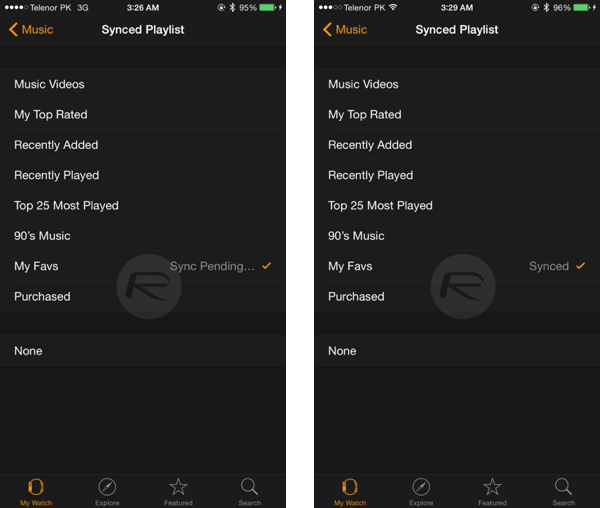
 Step 4: Once that decision has been made you need to tell the iPhone which music to sync across to your wrist by going over to the ‘Synced Playlist’ section. This is a case of selecting a playlist as that’s the only song management option available. It’s not ideal, but it works.
Note: You can create playlists on your iPhone using the stock iOS Music app.
Step 5: Sit back and wait. You might want to get a coffee – Bluetooth isn’t particularly quick. And also, the music will only sync if your Apple Watch is on charge.
And you’re done. Now you’re all set to run around with nothing but your Apple Watch and Bluetooth earphones and without a care in the world. Especially if you believe Apple’s ads!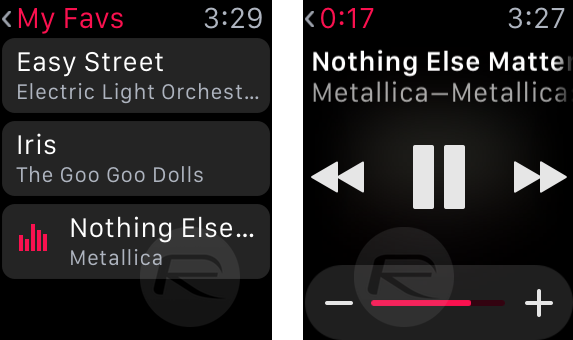

apple, #iPhone, #iphonerepair, #hemantsingh, #hemantinauckland, #hemant, #hemant021, #auckland, #hashtag, #iOS, #iPadPor, #crackescreen, #crackscreenrepair, #macbookrepair, #iPhone5unlock, #iPhone5sunlock, #iPhone6unlock, #iPhone6Sunlock, #iPhone6SPlusunlock, #networkunlock, #IMEIunlock, #VodafoneAustralia, #New, #Zealand, #iPadAir2, #iPadrepair, #iPadProrepair, #iPadAirrepair, #queenstreet, #queenstreetrepair, #02102444496, #021365325, #094192529, +642102444496, +6421365325, +6494192529, #facebook, #instagram, #snapchat, #freesexpicutres, #gaysex, #jobvacancyNZ, #jobvacancyAuckland, #liquiddamagerepair, #insurancereport, #insurancedamagereport, #Manukaurepair, #cityrepair, #idoctorrepair, #ifixit, #ifixyour, #ifixphone, #drphonerepair, #hemantsingh, #dougrobertson, #iphonerepairtools, #LCD, #iphoneparts, #mobilephonerepair, #auckland, #aucklanddesign, #logodesign, #queenstreetshopping, #aucklandshopping, #cbdshopping, #ipadprorepair, #samsungrepair, #GalaxyS5repair, #GalaxyS6repair, #GalaxyS7repair, #iPhone7release, #iPhone7unlock, #021365325, #02102444496, #094192529, #aucklanduniversity, #vodafonerepair, #latestmovies, #warrantyrepair, #sparkiPhone, #indianstudents, #stoleniphonecheck, #blacklisted, #blaclistediPhone, #facebook, #onlineauction, #cheapiPhone, #freesexvideo, #gaysex, #snapchat, #hotgirls, #aucklandclubbings, #instagrampictures, #freemoney, #socialmedia, #googleplus, #google+, #googlesearch, #trending

#clashofclan, #freeapps, #iosapps, #queenstreetrepair, #queenstreetiphonerepair, #queenstreetphonerepair, #aucklandipadrepair, #davidlim


