Showing posts with label Watch. Show all posts

Tuesday, 15 March 2016

How To Copy Music To Apple Watch From Apple iPhone And Use It As Standalone Apple iPod Touch? Dr Phone Repair, Queen Street, Auckland #drphonerepair, #drphone, #094192529


Dr Phone Repair Limited (Since 2015)
Tel: (09) 365-1212, Mobile: (021) 365-733


Here’s how you can copy music on your Apple Watch from your iPhone in a few easy steps. More details on this can be found here.

The Apple Watch is capable of all kinds of things from telling you the time to ordering you a cab and plenty of places in-between. It can also act as a new-age iPod too, though you’ll need a pair of Bluetooth earphones if you’re going to listen to music from your wrist. Or speakers if you want to go that way. We won’t judge you.

While Apple Watch allows you to listen to your entire music library from your iPhone remotely without having to copy the tracks over to the Watch itself, there are times when you would want to listen to music directly from Watch without having your iPhone around. Fortunately, Apple Watch allows you to do that easily. With up to 2GB of the Apple Watch’s 8GB of internal storage usable for music storage you should get around 500 tracks onto the thing before too much trouble, so here’s what you need to do.

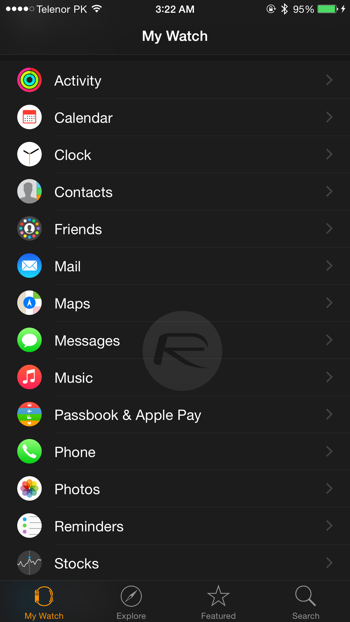
Step 1: Head on over to the Apple Watch app on your iPhone.

Step 2: Select ‘Music.’ Pretty self explanatory so far, no?
IMG_0419

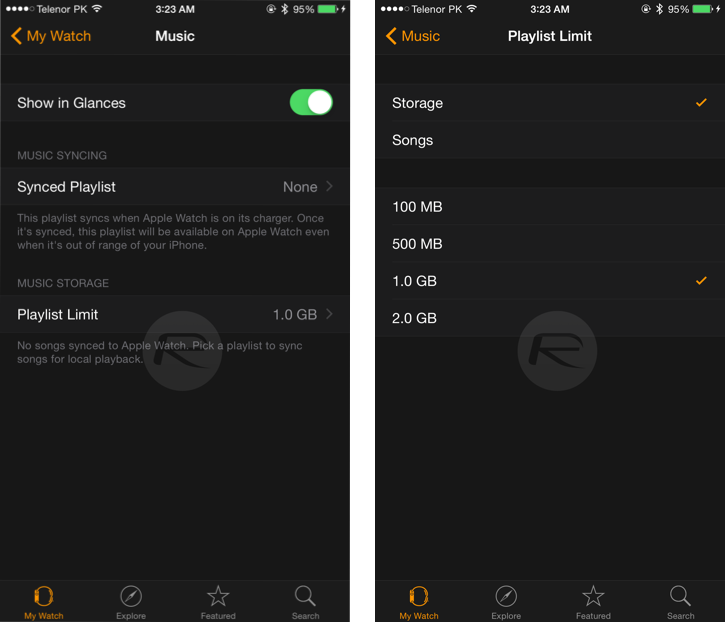
Step 3:
Tell the Apple Watch how you want to manage storage by heading over to ‘Playlist Limit.’ Do you want to limit the number of songs that are synced, or just tell the Apple Watch to work to a specified storage capacity?

IMG_0420
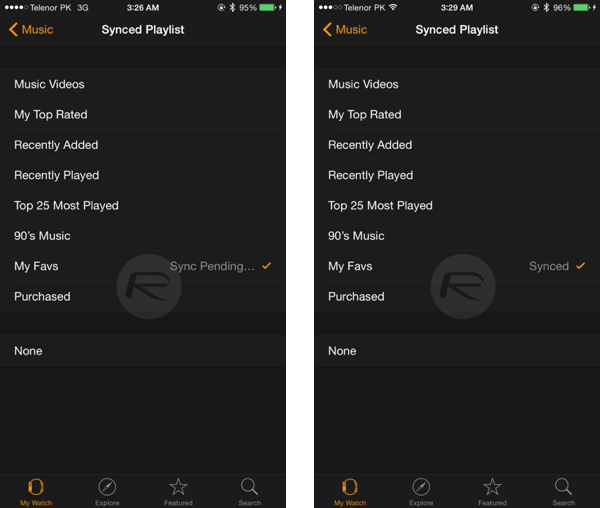
Step 4: Once that decision has been made you need to tell the iPhone which music to sync across to your wrist by going over to the ‘Synced Playlist’ section. This is a case of selecting a playlist as that’s the only song management option available. It’s not ideal, but it works.

Note: You can create playlists on your iPhone using the stock iOS Music app.

Step 5: Sit back and wait. You might want to get a coffee – Bluetooth isn’t particularly quick. And also, the music will only sync if your Apple Watch is on charge.
IMG_0422

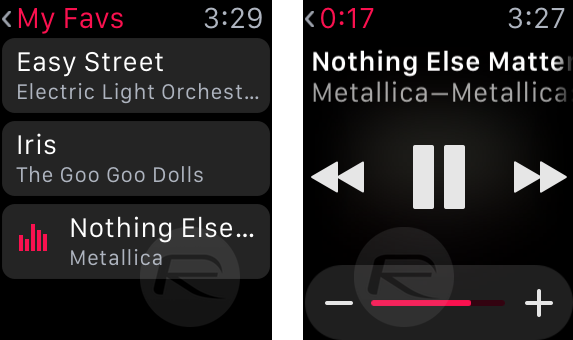
And you’re done. Now you’re all set to run around with nothing but your Apple Watch and Bluetooth earphones and without a care in the world. Especially if you believe Apple’s ads!
IMG_0427
apple, #iPhone, #iphonerepair, #hemantsingh, #hemantinauckland, #hemant, #hemant021, #auckland, #hashtag, #iOS, #iPadPor, #crackescreen, #crackscreenrepair, #macbookrepair, #iPhone5unlock, #iPhone5sunlock, #iPhone6unlock, #iPhone6Sunlock, #iPhone6SPlusunlock, #networkunlock, #IMEIunlock, #VodafoneAustralia, #New, #Zealand, #iPadAir2, #iPadrepair, #iPadProrepair, #iPadAirrepair, #queenstreet, #queenstreetrepair, #02102444496, #021365325, #094192529, +642102444496, +6421365325, +6494192529, #facebook, #instagram, #snapchat, #freesexpicutres, #gaysex, #jobvacancyNZ, #jobvacancyAuckland, #liquiddamagerepair, #insurancereport, #insurancedamagereport, #Manukaurepair, #cityrepair, #idoctorrepair, #ifixit, #ifixyour, #ifixphone, #drphonerepair, #hemantsingh, #dougrobertson, #iphonerepairtools, #LCD, #iphoneparts, #mobilephonerepair, #auckland, #aucklanddesign, #logodesign, #queenstreetshopping, #aucklandshopping, #cbdshopping, #ipadprorepair, #samsungrepair, #GalaxyS5repair, #GalaxyS6repair, #GalaxyS7repair, #iPhone7release, #iPhone7unlock, #021365325, #02102444496, #094192529, #aucklanduniversity, #vodafonerepair, #latestmovies, #warrantyrepair, #sparkiPhone, #indianstudents, #stoleniphonecheck, #blacklisted, #blaclistediPhone, #facebook, #onlineauction, #cheapiPhone, #freesexvideo, #gaysex, #snapchat, #hotgirls, #aucklandclubbings, #instagrampictures, #freemoney, #socialmedia, #googleplus, #google+, #googlesearch, #trending

#clashofclan, #freeapps, #iosapps, #queenstreetrepair, #queenstreetiphonerepair, #queenstreetphonerepair, #aucklandipadrepair, #davidlim


How to put apple watch in power saving mode: Turn Power saver. Auckland iPhone iPad Repair, drphonerepair, drphone, Queen Street, #iPhonerepair

Dr Phone Repair Limited (Since 2015)
Tel: (09) 365-1212, Mobile: (021) 365-733


Apple knows about apple watch usage in future, So most of the case you might be suffer from low battery any time. At this moment you need to put your Apple watch in almost dead condition means Smart watch will become simple watch that will only use for see current time. Power reserve functionality works as power saving mode. Here I gave guide with step by step instructions on how to put apple watch in power saving mode. After that how we can put apple watch normal mode for use smart watch app after enough battery. Alternatively you can use small pocket size external charger for Apple watch.

Note: Apple watch Battery conditions with saving tips are, you can use two day continuously after charge 100% (Full battery).


Steps to Enable/ Disable or put apple watch in power saving mode:

Apple watch use on Low battery charging quite interesting but notice that you can only use for time showing purpose, as of discussed in apple watch keynote you can run Power reserve mode for next 72 hours.

Step 1: grip your apple watch on your wrist

Step 2: Press and hold side button placed at below of the digital crown.

Step 3: You will see three options: Power off, Power Saver and Lock device.

Step 4: Swipe toggle on right from the Power saver option

Now put your device normal battery power mode

In the process of revert back in normal mode, you need to restart or shut down watch. For restart follow the above three step and Tap and hold side button and release when apple logo will be shown.

Note: are you fail in any case first check your device updated with latest iOS 8.3 or newer, then pair Apple watch with iPhone.

Still are you facing some problem Put apple watch in power saving mode and might be confuse due to settings accuracy share with us on comment.


#drphonerepair, #drphonerepairlimited, #drphonenz, #queenstreetrepair, #aucklandrepair, @drphonenz, #021365733, #093651212, #drphonenz@gmail.com, #davidlim, #davidlimnz, #kevinlim, #kevinlimzz, #facebooklike, #googleblog, #bloggernz, #macBookairrepair, #macbookprorepair, #iPadprorepair, #ipodtouchrepair, #fixiphone, #fixmyiphone, @davidlim,


#apple, #iPhone, #iphonerepair, #hemantsingh, #hemantinauckland, #hemant, #hemant021, #auckland, #hashtag, #iOS, #iPadPor, #crackescreen, #crackscreenrepair, #macbookrepair, #iPhone5unlock, #iPhone5sunlock, #iPhone6unlock, #iPhone6Sunlock, #iPhone6SPlusunlock, #networkunlock, #IMEIunlock, #VodafoneAustralia, #New, #Zealand, #iPadAir2, #iPadrepair, #iPadProrepair, #iPadAirrepair, #queenstreet, #queenstreetrepair, #02102444496, #021365325, #094192529, +642102444496, +6421365325, +6494192529, #facebook, #instagram, #snapchat, #freesexpicutres, #gaysex, #jobvacancyNZ, #jobvacancyAuckland, #liquiddamagerepair, #insurancereport, #insurancedamagereport, #Manukaurepair, #cityrepair, #idoctorrepair, #ifixit, #ifixyour, #ifixphone, #drphonerepair, #hemantsingh, #dougrobertson, #iphonerepairtools, #LCD, #iphoneparts, #mobilephonerepair, #auckland, #aucklanddesign, #logodesign, #queenstreetshopping, #aucklandshopping, #cbdshopping, #ipadprorepair, #samsungrepair, #GalaxyS5repair, #GalaxyS6repair, #GalaxyS7repair, #iPhone7release, #iPhone7unlock, #021365325, #02102444496, #094192529, #aucklanduniversity, #vodafonerepair, #latestmovies, #warrantyrepair, #sparkiPhone, #indianstudents, #stoleniphonecheck, #blacklisted, #blaclistediPhone, #facebook, #onlineauction, #cheapiPhone, #freesexvideo, #gaysex, #snapchat, #hotgirls, #aucklandclubbings, #instagrampictures, #freemoney, #socialmedia, #googleplus, #google+, #googlesearch, #trending

#clashofclan, #freeapps, #iosapps, #queenstreetrepair, #queenstreetiphonerepair, #queenstreetphonerepair, #aucklandipadrepair, #davidlim

9 Tips to Boost Apple Watch Battery Life. Dr Phone Repair, Queen Street, Auckland, drphone, 094192526

Dr Phone Repair [Map]
G-11, Canterbury Arcade
170, Queen Street
Auckland CDB 1010
Tel: (09) 419-2529
Sales: (021) 365-325, Tech: (021) 02444496
Email - Website - FaceBook - Google+
Image result for how to save apple watch battery

Battery life could be the biggest concern for any electronic gadget user. Perhaps this could be the reason why, after launching its latest product Apple Watch, Apple has floated some crucial information on how to save battery life of your Apple Watch. This has come from horse’s mouth and hence, you can always rely on this information. Owners of Apple Watch, by now, must have experienced many things on their smart watch. If your Apple Watch battery drains fast, iGeeksBlog has listed a few tips to improve Apple Watch battery life. Follow the tips and share your opinions, or maybe you would like to share your own tips!

9 Tips to Boost Apple Watch Battery Life

#1. Use the latest software
For Apple Watch lover, this goes without saying. However, if you have failed to update the latest version of Watch OS, please do it right now because this will surely help you save on the battery life of Apple Watch. Open the Apple Watch app on your iPhone and go to My Watch → General → Software Update.

If any update is available, connect your iPhone to Wi-Fi, attach the charger to your Apple Watch and update. While doing this, please ensure that your Apple Watch has at least 50% charge.

#2. Power Saving Mode
Fitness freaks would like to use heart rate sensor while they are working out at gym or at home. But guys, if you if you turn Power Saving Mode on during those long fitness regimen, you can save on your Apple Watch battery life. Though it will disable the heart rate sensor, your purpose of saving battery life would be fulfilled. To turn on Power Saving Mode, open the Apple Watch app on iPhone, then go to My Watch → Workout, and tap on Power Saving Mode to turn it on. However, you may not get exact reading of how much calorie you have burnt when the heart rate sensor is off.

#3. Use Bluetooth Chest Strap
For professional athlete, who has to work out for long time, Apple suggests use of Bluetooth chest strap and not its built-in heart rate sensor. This practice will save your Apple Watch battery and will help you use your smart watch for long time. Keep your strap in pairing mode to pair the Bluetooth chest strap with your Apple Watch; then go to Settings on Apple Watch → select Bluetooth → and choose from the list of Health Devices.

#4. Turn Off Wrist Raise
Hyper active folks would always have a frequent looks at their wrist watches; perhaps, they have made a habit of it. Sensing this, Apple Watch has a smart Wrist Raise feature that turns the Watch on when you raise your wrist to check time. But this smart feature has its own disadvantage in burning battery. Hence, you need to turn this feature off; go to Settings on your Apple Watch → select General → and turn Activate on Wrist Raise off. And when you wish to turn it on the display, just tap it.

#5. Don’t Disable Bluetooth on iPhone
At all times, you need to have your iPhone connected with your Apple Watch via Bluetooth. If you disable Bluetooth on your iPhone, your Apple Watch battery will start draining fast. To save more battery on your Watch, keep Bluetooth enabled on your iPhone and enjoy better communications between the two devices.

#6. Power Reserve Mode
If you are in the habit of frequently watching your Apple Watch just to check time, this Power Reserve mode is very helpful to save on battery life of your smart Watch. By selecting Power Reserve mode on your Watch, battery life will automatically be improved as this will push other functions in sleep mode; functions like notifications and activity monitoring will go into sleep mode. Power Reserve mode will consume low energy and will display only the time on your Apple Watch. To put your Watch on Power Reserve mode, hold down the side button until the power off screen appears; then slide Power Reserve. You can see only a clock until you hold down the side button again to reboot.

#7. Minimize Motion
Normally animation eats up more battery on iPhone, and therefore, it is my extrapolation from the past experience that animation will have similar effect on Apple Watch. If you want to minimize motion, go the Apple Watch app on iPhone, tap General, then tap Accessibility and turn on Reduce Motion and Reduce Transparency.

#8. No Unnecessary Notifications
Users like to turn social media notifications on; Facebook, Twitter, Google+, Instagram, Pinterest etc may not be as important as your office emails. Keeping unnecessary notifications open can drain your Apple Watch battery, and therefore, I prefer to turn social media notifications off during the day. I keep messages, mails, phone, and calendar open.

#9. Let the Black Magic Prevail
Black pixels consume little battery on your Apple Watch; and color pixels would guzzle the battery, therefore, keep the screen of your smart Watch black to save on battery life. Reckless time waste on viewing photos and using animated emoji will drain the battery. Discretionary use of Apple Watch will always help you save its battery; if you have to use some social media channels, you can always go to your iPhone.

## Bonus Tip
Keep Laptop/Macbook Power Source On While Charging Apple Watch
Professionals follow this practice of charging their mobiles from their laptop; if you are doing the same with your Apple Watch, be careful that your laptop/Macbook is plugged in and power is on while you are charging the Watch through USB. Your Apple Watch battery may drain if your Watch is connected with a laptop that does not receive any power supply; moreover do not leave your Macbook/laptop on hibernate or standby mode.
#apple, #iPhone, #iphonerepair, #hemantsingh, #hemantinauckland, #hemant, #hemant021, #auckland, #hashtag, #iOS, #iPadPor, #crackescreen, #crackscreenrepair, #macbookrepair, #iPhone5unlock, #iPhone5sunlock, #iPhone6unlock, #iPhone6Sunlock, #iPhone6SPlusunlock, #networkunlock, #IMEIunlock, #VodafoneAustralia, #New, #Zealand, #iPadAir2, #iPadrepair, #iPadProrepair, #iPadAirrepair, #queenstreet, #queenstreetrepair, #02102444496, #021365325, #094192529, +642102444496, +6421365325, +6494192529, #facebook, #instagram, #snapchat, #freesexpicutres, #gaysex, #jobvacancyNZ, #jobvacancyAuckland, #liquiddamagerepair, #insurancereport, #insurancedamagereport, #Manukaurepair, #cityrepair, #idoctorrepair, #ifixit, #ifixyour, #ifixphone, #drphonerepair, #hemantsingh, #dougrobertson, #iphonerepairtools, #LCD, #iphoneparts, #mobilephonerepair, #auckland, #aucklanddesign, #logodesign, #queenstreetshopping, #aucklandshopping, #cbdshopping, #ipadprorepair, #samsungrepair, #GalaxyS5repair, #GalaxyS6repair, #GalaxyS7repair, #iPhone7release, #iPhone7unlock, #021365325, #02102444496, #094192529, #aucklanduniversity, #vodafonerepair, #latestmovies, #warrantyrepair, #sparkiPhone, #indianstudents, #stoleniphonecheck, #blacklisted, #blaclistediPhone, #facebook, #onlineauction, #cheapiPhone, #freesexvideo, #gaysex, #snapchat, #hotgirls, #aucklandclubbings, #instagrampictures, #freemoney, #socialmedia, #googleplus, #google+, #googlesearch, #trending

#clashofclan, #freeapps, #iosapps, #queenstreetrepair, #queenstreetiphonerepair, #queenstreetphonerepair, #aucklandipadrepair, #davidlim

Thursday, 3 March 2016

The first 14 Apple Watch apps you should check out! iOS 9, Apple, iPhone iPad Repair, Unlock, Dr Phone Repair, Queen Street


Without apps, the Apple Watch is nothing more than a glorified timepiece. Here are Apple's included apps, plus a selection of 14 third-party options we think are worth checking out now.
Image result for Convert Apple Watch to a phone?
Apple Watch is finally shipping and before the end of the day today, some users will have the wearable in their hands (or on their wrists). Once you have it up and running and paired with an iPhone, one of the first thoughts on your mind will likely be, bring on the the apps! According to CNET's Scott Stein, however, you may want to lower your expectations.
Due to the fact that third-party app makers do not yet have access to the Watch's Software Developers Kit (SDK), some third-party apps are lacking in features. Now, the rumor is that Apple will announce availability of the SDK in June at WWDC, but until then developers won't have access to the Watch's motion sensor, the camera or any of the tech that's actually inside it.
Image result for Convert Apple Watch to a phone?

Still, Scott says that out of about the nearly 100 third-party apps he's used over the last few weeks, there are some that are worth trying. Check out the chart and gallery in the third-party apps section at the bottom of the page to get a glimpse of those.

Image result for Convert Apple Watch to a phone?

Meanwhile, since Apple does have access to the full capabilities of Apple Watch, its apps are much more polished and useful. Check those out right below.


There are a number of apps that will come with the Apple Watch that help you connect with your iPhone's core functions like Messages, Maps, Calendar and even Siri. They all run extremely smoothly, as expected.

APPLE APPS

AppDescription
ActivityThree rings show how long you've moved, exercised and stood.
AlarmManage, edit and label multiple alarms from your wrist.
CalendarSee what's next in your day or month. See reminders for meetings and events.
MailAs well as reading email, you can flag it, mark it as read, or delete.
MapsSee your current location and get directions with turn-by-turn navigation.
MessagesDictate or record replies and send animated emoji.
MusicControl the music on your iPhone without taking it out of your pocket.
PassbookStore your boarding passes, tickets, loyalty cards and more.
PhoneUse the microphone to talk, or transfer to your iPhone, or mute.
PhotosKeep your favorite photos on your watch for convenient viewing.
RemoteNavigate Apple TV and control the iTunes library on your desktop PC or Mac.
Remote CameraUse your Apple Watch as the viewfinder to take a shot from your iPhone.
SettingsEnable or disable Airplane mode, Bluetooth and Do Not Disturb.
SiriSay, 'Hey Siri,' then ask a question, just like on your phone.
StocksSee the price of the stocks you watch at a glance.
StopwatchTrack your lap times with digital, analog and hybrid views.
TimerSet a timer for cooking and other things with a visual countdown graphic.
WeatherCheck the weather where you are or for any location around the world.
WorkoutTrack your workout, your heart rate and more.
World ClockCheck the time in different cities around the globe.


Image result for Convert Apple Watch to a phone?

Third-party apps worth trying right now

Third-party apps don't run as smoothly as the Apple-made ones included on the Apple Watch. But there are several that are still useful when you just want a quick glance at the latest information

AppDeveloperDescription
TwitterTwitterCheck your feed, post a tweet and reply to tweets.
StarbucksStarbucksUse a QR code to pay with your account from your watch.
1PasswordAgileBitsKeep your stored account passwords on your watch for easy access.
CitibankCitibankTrack your bank accounts from your watch.
MLB At BatMLBGet the latest baseball scores and basic stat info to follow the games of your choice.
TV GuideCBSSee trending shows that you can watch tonight.
EvernoteEvernoteScan your notes and even add new ones using dictation on your watch.
NYTimesNYTimesSwipe through headlines from your wrist, but you'll need a subscription.
TheConvertedIdeon ASQuick access to favorite conversions and perform any conversion simply by talking to your Apple Watch.
TheScoreTheScoreIf you want more than baseball, this app will give you the latest updates on your wrist.
YelpYelpFind the best restaurants and other services around you with only a few taps.
TripAdvisorTripAdvisorPlan and enjoy your perfect trip with over 150 million reviews and opinions by travelers.
ElevateElevateTry a brain-training program designed to improve focus, speaking abilities and more.
PandoraPandora MediaFind out the song playing, or give thumbs up to the song you're listening to.
Image result for Convert Apple Watch to a phone?

Apple Watch
THE BOTTOM LINE: The Apple Watch is the most ambitious, well-constructed smartwatch ever seen, but first-gen shortfalls make it feel more like a fashionable toy than a necessary tool. That may change with a big software update later this year, though.