Showing posts with label iPod. Show all posts

Tuesday, 15 March 2016

How To Copy Music To Apple Watch From Apple iPhone And Use It As Standalone Apple iPod Touch? Dr Phone Repair, Queen Street, Auckland #drphonerepair, #drphone, #094192529


Dr Phone Repair Limited (Since 2015)
Tel: (09) 365-1212, Mobile: (021) 365-733


Here’s how you can copy music on your Apple Watch from your iPhone in a few easy steps. More details on this can be found here.

The Apple Watch is capable of all kinds of things from telling you the time to ordering you a cab and plenty of places in-between. It can also act as a new-age iPod too, though you’ll need a pair of Bluetooth earphones if you’re going to listen to music from your wrist. Or speakers if you want to go that way. We won’t judge you.

While Apple Watch allows you to listen to your entire music library from your iPhone remotely without having to copy the tracks over to the Watch itself, there are times when you would want to listen to music directly from Watch without having your iPhone around. Fortunately, Apple Watch allows you to do that easily. With up to 2GB of the Apple Watch’s 8GB of internal storage usable for music storage you should get around 500 tracks onto the thing before too much trouble, so here’s what you need to do.

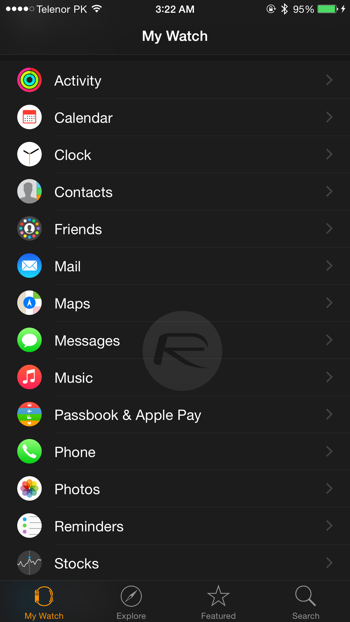
Step 1: Head on over to the Apple Watch app on your iPhone.

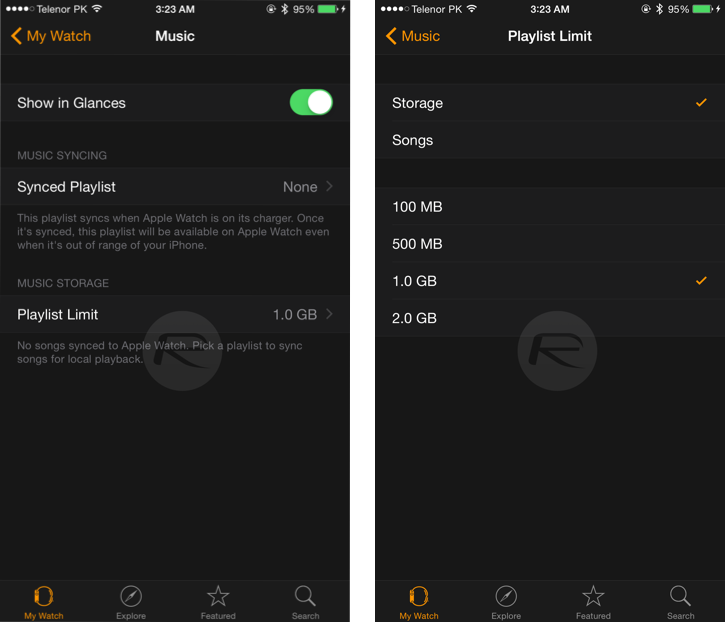
Step 2: Select ‘Music.’ Pretty self explanatory so far, no?
IMG_0419

Step 3:
Tell the Apple Watch how you want to manage storage by heading over to ‘Playlist Limit.’ Do you want to limit the number of songs that are synced, or just tell the Apple Watch to work to a specified storage capacity?
IMG_0420
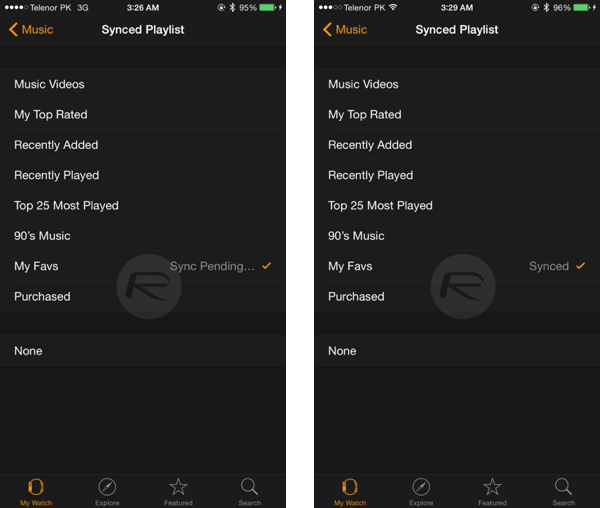
Step 4: Once that decision has been made you need to tell the iPhone which music to sync across to your wrist by going over to the ‘Synced Playlist’ section. This is a case of selecting a playlist as that’s the only song management option available. It’s not ideal, but it works.

Note: You can create playlists on your iPhone using the stock iOS Music app.

Step 5: Sit back and wait. You might want to get a coffee – Bluetooth isn’t particularly quick. And also, the music will only sync if your Apple Watch is on charge.
IMG_0422

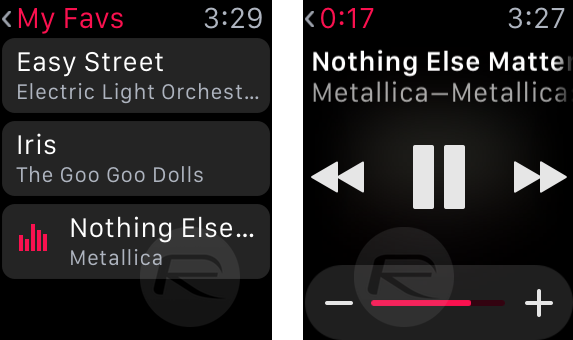
And you’re done. Now you’re all set to run around with nothing but your Apple Watch and Bluetooth earphones and without a care in the world. Especially if you believe Apple’s ads!
IMG_0427
apple, #iPhone, #iphonerepair, #hemantsingh, #hemantinauckland, #hemant, #hemant021, #auckland, #hashtag, #iOS, #iPadPor, #crackescreen, #crackscreenrepair, #macbookrepair, #iPhone5unlock, #iPhone5sunlock, #iPhone6unlock, #iPhone6Sunlock, #iPhone6SPlusunlock, #networkunlock, #IMEIunlock, #VodafoneAustralia, #New, #Zealand, #iPadAir2, #iPadrepair, #iPadProrepair, #iPadAirrepair, #queenstreet, #queenstreetrepair, #02102444496, #021365325, #094192529, +642102444496, +6421365325, +6494192529, #facebook, #instagram, #snapchat, #freesexpicutres, #gaysex, #jobvacancyNZ, #jobvacancyAuckland, #liquiddamagerepair, #insurancereport, #insurancedamagereport, #Manukaurepair, #cityrepair, #idoctorrepair, #ifixit, #ifixyour, #ifixphone, #drphonerepair, #hemantsingh, #dougrobertson, #iphonerepairtools, #LCD, #iphoneparts, #mobilephonerepair, #auckland, #aucklanddesign, #logodesign, #queenstreetshopping, #aucklandshopping, #cbdshopping, #ipadprorepair, #samsungrepair, #GalaxyS5repair, #GalaxyS6repair, #GalaxyS7repair, #iPhone7release, #iPhone7unlock, #021365325, #02102444496, #094192529, #aucklanduniversity, #vodafonerepair, #latestmovies, #warrantyrepair, #sparkiPhone, #indianstudents, #stoleniphonecheck, #blacklisted, #blaclistediPhone, #facebook, #onlineauction, #cheapiPhone, #freesexvideo, #gaysex, #snapchat, #hotgirls, #aucklandclubbings, #instagrampictures, #freemoney, #socialmedia, #googleplus, #google+, #googlesearch, #trending

#clashofclan, #freeapps, #iosapps, #queenstreetrepair, #queenstreetiphonerepair, #queenstreetphonerepair, #aucklandipadrepair, #davidlim


How to put apple watch in power saving mode: Turn Power saver. Auckland iPhone iPad Repair, drphonerepair, drphone, Queen Street, #iPhonerepair

Dr Phone Repair Limited (Since 2015)
Tel: (09) 365-1212, Mobile: (021) 365-733


Apple knows about apple watch usage in future, So most of the case you might be suffer from low battery any time. At this moment you need to put your Apple watch in almost dead condition means Smart watch will become simple watch that will only use for see current time. Power reserve functionality works as power saving mode. Here I gave guide with step by step instructions on how to put apple watch in power saving mode. After that how we can put apple watch normal mode for use smart watch app after enough battery. Alternatively you can use small pocket size external charger for Apple watch.

Note: Apple watch Battery conditions with saving tips are, you can use two day continuously after charge 100% (Full battery).


Steps to Enable/ Disable or put apple watch in power saving mode:

Apple watch use on Low battery charging quite interesting but notice that you can only use for time showing purpose, as of discussed in apple watch keynote you can run Power reserve mode for next 72 hours.

Step 1: grip your apple watch on your wrist

Step 2: Press and hold side button placed at below of the digital crown.

Step 3: You will see three options: Power off, Power Saver and Lock device.

Step 4: Swipe toggle on right from the Power saver option

Now put your device normal battery power mode

In the process of revert back in normal mode, you need to restart or shut down watch. For restart follow the above three step and Tap and hold side button and release when apple logo will be shown.

Note: are you fail in any case first check your device updated with latest iOS 8.3 or newer, then pair Apple watch with iPhone.

Still are you facing some problem Put apple watch in power saving mode and might be confuse due to settings accuracy share with us on comment.


#drphonerepair, #drphonerepairlimited, #drphonenz, #queenstreetrepair, #aucklandrepair, @drphonenz, #021365733, #093651212, #drphonenz@gmail.com, #davidlim, #davidlimnz, #kevinlim, #kevinlimzz, #facebooklike, #googleblog, #bloggernz, #macBookairrepair, #macbookprorepair, #iPadprorepair, #ipodtouchrepair, #fixiphone, #fixmyiphone, @davidlim,


#apple, #iPhone, #iphonerepair, #hemantsingh, #hemantinauckland, #hemant, #hemant021, #auckland, #hashtag, #iOS, #iPadPor, #crackescreen, #crackscreenrepair, #macbookrepair, #iPhone5unlock, #iPhone5sunlock, #iPhone6unlock, #iPhone6Sunlock, #iPhone6SPlusunlock, #networkunlock, #IMEIunlock, #VodafoneAustralia, #New, #Zealand, #iPadAir2, #iPadrepair, #iPadProrepair, #iPadAirrepair, #queenstreet, #queenstreetrepair, #02102444496, #021365325, #094192529, +642102444496, +6421365325, +6494192529, #facebook, #instagram, #snapchat, #freesexpicutres, #gaysex, #jobvacancyNZ, #jobvacancyAuckland, #liquiddamagerepair, #insurancereport, #insurancedamagereport, #Manukaurepair, #cityrepair, #idoctorrepair, #ifixit, #ifixyour, #ifixphone, #drphonerepair, #hemantsingh, #dougrobertson, #iphonerepairtools, #LCD, #iphoneparts, #mobilephonerepair, #auckland, #aucklanddesign, #logodesign, #queenstreetshopping, #aucklandshopping, #cbdshopping, #ipadprorepair, #samsungrepair, #GalaxyS5repair, #GalaxyS6repair, #GalaxyS7repair, #iPhone7release, #iPhone7unlock, #021365325, #02102444496, #094192529, #aucklanduniversity, #vodafonerepair, #latestmovies, #warrantyrepair, #sparkiPhone, #indianstudents, #stoleniphonecheck, #blacklisted, #blaclistediPhone, #facebook, #onlineauction, #cheapiPhone, #freesexvideo, #gaysex, #snapchat, #hotgirls, #aucklandclubbings, #instagrampictures, #freemoney, #socialmedia, #googleplus, #google+, #googlesearch, #trending

#clashofclan, #freeapps, #iosapps, #queenstreetrepair, #queenstreetiphonerepair, #queenstreetphonerepair, #aucklandipadrepair, #davidlim

Thursday, 25 February 2016

Hooray! Our Google+, Google Plus Account is active for mobile phone repair (Queen Street, Auckland) Dr Phone Repair 094192529


Dr Phone Repair
G-11, Canterbury Arcade
170, Queen Street
Auckland CBD 1010
Tel: (09) 419-2529
Sales: 
Tech: (021) 0244-4496
drphonenz<a>gmail.com

Kia Ora! We are delighted to inform our dear customer and mobile phone repair customer that our Google Plus account is active today.


On top that, it is linked to our smarphone and computer repair blog (hosted with Google Blogspot).
The blog address is http://drphonerepair.blogspot.co.nz/

Our Google Plus link is located here!

https://plus.google.com/111294094113480926585/posts

You may ask why use Google Plus or Google+?  The first name that comes to mind when you think about social media might not be Google Plus. Facebook, Twitter, LinkedIn and Pinterest enjoy greater buzz. Why then should your small business use Google Plus?


There are some very compelling arguments in favor of including Google+ in a social media marketing strategy.

Google Plus has a huge user base. With more than 540 million active monthly users, Google Plus sees its number of users increase daily. Facebook continues to be the social media behemoth with the most users. But the increase in web traffic via this site indicates that businesses can choose to ignore it at their own peril. Besides, the value of grabbing the first mover advantage over one's competition cannot be overstated. Google+ users are often early adopters and technology lovers. Your customers will be on it sooner rather than later and many probably already are.

Related: 4 Ideas for Hosting Google+ Hangouts 'On Air'

Make use of Google Hangouts. With Google Hangouts, free live video conferencing can take place for as many as 10 people. The benefits for a small business are obvious: You can reach out to customers, dealers, vendors and social media contacts at no cost. You can also participate in Hangouts initiated by others and communicate with thought leaders in your niche.

Be cognizant of the Google connection. Google is at the epicenter of all search engines. While Bing is also a player, Google is still the big daddy. There is sufficient anecdotal evidence to suggest that profiles that do well on Google+ get indexed quicker on Google. Add to that the fact that Google Plus business pages are beginning to show up on search engine results pages, and you have two very strong reasons to work on establishing a presence here. Integration of Google’s many services with one another, such as Google+ with Youtube, search, etc. is perhaps inevitable. Be there to take advantage of it.

Take advantage of Google+ reviews. With Google+ reviews showing up on search results, potential customers might be influenced to choose your business if they come across positive reviews. Therefore, provide great service and proactively solicit reviews on Google+. Nothing beats a favorable reference from one human being to another. Along the same lines, searchers looking for local businesses, particularly those on the move and using mobiles can find your store if your Google+ business page carries the relevant information with Google Maps embedded, office hours  and your phone number. This is truly a requirement for any small business.

Explore Google+ Ripples. Google Plus is a feature-rich social media platform; you can leverage Circles, Hangouts, Hangouts on Air, Communities and Ripples. The latter category can be particularly useful for small businesses. It is a data visualization graph that lets you take in at a glance the manner in which your content has been shared. You can easily learn about your more enthusiastic and influential followers. Ripples is also a fun tool to use and worth checking out.

It’s highly likely that your customers are already on Google+ and your regular activity on social media can be a valuable signal to others and it will help boost your search engine ranking. Google+ has a gold mine of worthwhile content that you can draw inspiration from and curate. If you’re not already on Google+, it’s time to start using one of the most powerful tools online. 


Image result for google plus

#apple, #iPhone

Saturday, 20 February 2016

Our new business card for Computer Repair and Apple iPhone Unlock, Queen Street, Auckland, CBD 094192529


Check out our first version of business card or "calling card".  We have printed over 10,000 copies last week and get ready for business.  The cards are given to our computer repair and Apple iPhone unlock customers.

The QR code make it easy for iOS or Google Android phone user to obtain our contact details without typing on the smartphone.


Dr Phone Repair
G-11, Canterbury Arcade
170, Queen Street
Auckland CDB 1010
Tel: (09) 419-2529
Sales: 
Tech: (021) 0244-4496
drphonenz[a]gmail.com

#apple, #iPhone, #iphonerepair, #auckland, #hashtag, #iOS, #iPadPor, #crackescreen, #crackscreenrepair, #macbookrepair, #iPhone5unlock, #iPhone5sunlock, #iPhone6unlock, #iPhone6Sunlock, #iPhone6SPlusunlock, #networkunlock, #IMEIunlock, #VodafoneAustralia, #New, #Zealand, #iPadAir2, #iPadrepair, #iPadProrepair, #iPadAirrepair, #queenstreet, #queenstreetrepair, #02102444496, #094192529, +642102444496, 6#instagram, #snapchat, #freesexpicutres, #jobvacancyNZ, #jobvacancyAuckland
#liquiddamagerepair, #insurancereport, #insurancedamagereport, #Manukaurepair, #cityrepair, #idoctorrepair, #ifixit, #ifixyour, #ifixphone, #drphonerepair, #hemantsingh,  #iphonerepairtools, #LCD, #iphoneparts, #mobilephonerepair, #auckland
#aucklanddesign, #logodesign, #queenstreetshopping, #aucklandshopping, #cbdshopping

Our newly minted logo for Apple iPhone Repair, Auckland CDB, www.drphone.co.nz, 09-4192529, 02102444496, unlock, iOS

This logo took us over a week of designing plus another few days of "look and feel" improvements.  Hope this will be eye-pleasing to our corporate and retail customers!

If you need your iPhone 6, Samsung Galaxy S6 Edge+ cracked screen repair/replace, just give us a bell and we sort you out.  Just in case you need our details, please see below:


Dr Phone Repair
G-11, Canterbury Arcade
170, Queen Street
Auckland CDB 1010
Tel: (09) 419-2529
Sales: 
Tech: (021) 0244-4496
drphonenz[a]gmail.com

#apple, #iPhone, #iphonerepair, #auckland, #hashtag, #iOS, #iPadPor, #crackescreen, #crackscreenrepair, #macbookrepair, #iPhone5unlock, #iPhone5sunlock, #iPhone6unlock, #iPhone6Sunlock, #iPhone6SPlusunlock, #networkunlock, #IMEIunlock, #VodafoneAustralia, #New, #Zealand, #iPadAir2, #iPadrepair, #iPadProrepair, #iPadAirrepair, #queenstreet, #queenstreetrepair, #02102444496,#094192529, +642102444496, +6494192529, #facebook, #instagram, #snapchat, #freesexpicutres,  #jobvacancyNZ, #jobvacancyAuckland
#liquiddamagerepair, #insurancereport, #insurancedamagereport, #Manukaurepair, #cityrepair, #idoctorrepair, #ifixit, #ifixyour, #ifixphone, #drphonerepair, #hemantsingh, #iphonerepairtools, #LCD, #iphoneparts, #mobilephonerepair, #auckland

#aucklanddesign, #logodesign, #queenstreetshopping, #aucklandshopping, #cbdshopping